(650) 332-8623
Cost Reporting in Construction: A Quick Guide for Contractors
This quick guide looks at cost reporting in construction and how you can use it as a tool to avoid going over budget and hit your financial project goals.


Weather conditions, overtime, and the rising costs of materials—all can affect a project’s progress. But with the right construction planning, you can avoid major cost overruns, the secret is mastering construction cost reporting.
Construction cost reporting is an essential part of construction expense management and the broader process of managing a construction project. Without effective cost reporting, you can’t effectively estimate the cost of new jobs or accurately bill clients. You may even fail to turn a profit.
Let’s look at construction cost reporting, why it’s important, and how you can build your next construction cost reports with our all-in-one construction cost reporting guide.
What Is Cost Reporting in Construction?
Construction cost reporting is the process of tracking and documenting all costs associated with a construction project. It sits alongside job costing for construction as one of the two core financial disciplines every contractor needs, with job costing focused on estimating and allocating costs per project and cost reporting focused on tracking whether those estimates are holding up in practice.
Equipment can distort that picture when ownership, rental, fuel, and operating costs are not allocated consistently; our equipment job costing guide shows how to capture them.
There are a variety of tools and apps available to help with construction cost reporting. These typically include features such as real-time tracking and reporting, budget management, and scheduling.
Why Are Construction Cost Reports Important?
Without construction cost reports, it’s impossible for companies to effectively manage their costs and communicate changes in budget or schedule. Accurately tracking and reporting your costs helps you stay on track throughout the project—and makes you aware of potential overruns while they can still be mitigated.
Mainsail Painting, a Cape Cod painting company that grew to a team of 15, learned this the hard way. Owner Vinny Gondim noticed the business was consistently losing money because manual tracking made it impossible to capture expenses with full precision or bill clients accurately for every hour worked. Small rounding errors compounded across multiple job sites until they had a measurable impact on profitability.
After switching to Workyard, the company gained the visibility it needed to track labor costs and expenses at the project level, and Vinny described it as the tool that allowed the business to grow without losing money in the process.
After a project is completed, construction cost reports provide valuable insights into how expenses are trending over time.
That historical data also becomes an asset when working with your construction finance and accounting team, giving them the accurate project-level cost history they need for tax reporting, forecasting, and financial planning.
Construction Cost Reporting Step By Step
Let’s get into how you actually create a construction cost report. Construction cost reporting should be completed not when the project is over but at intervals throughout the project—to determine whether the project is still on track. Follow these steps to ensure successful and accurate reporting:
1. Gather Cost Data Regularly
To create an accurate construction cost report, it’s essential to have a complete understanding of all costs associated with the project. This includes fixed expenses, variable expenses, direct expenses, indirect expenses, and any incidentals that occur throughout the project.
For construction companies using QuickBooks, understanding how cost of goods sold in QuickBooks is categorized helps ensure that materials, subcontractor costs, and direct labor are recorded in a way that flows correctly into your cost reports.
These fixed costs are closely related to overhead costs, and understanding how to calculate your overhead rate is what allows you to allocate these indirect expenses to specific projects accurately. Variable costs fluctuate depending on the circumstances; this includes labor costs, material costs, and rentals.
One of the most common gaps in cost data accuracy is untagged labor hours—time that arrives at payroll without being tied to a specific job or cost category. If your team hasn’t set up a reliable system to stop hours from arriving at payroll without construction cost codes, those hours become nearly impossible to assign retroactively, which undermines the accuracy of every cost report you produce.
Mobile job tracking apps make it much easier to capture and track labor-related expenditures and mileage throughout the project. The advantage of these apps is that they completely automate the accurate capture of time spent on each project, saving you hours of time wrestling with error-prone spreadsheets and manual data entry. They also give you a real-time view of how your costs are tracking compared to plan, so you can do something about overruns before it’s too late.
2. Implement A Reporting System That Gives You Answers Quickly
You need a cost reporting system that allows you to quickly review your costs on a regular basis to spot any areas where costs may be increasing or decreasing. You don’t want to be manually manipulating data every time you want to answer a simple question like how much have you spent on labor for a particular stage of a project.
Your options are:
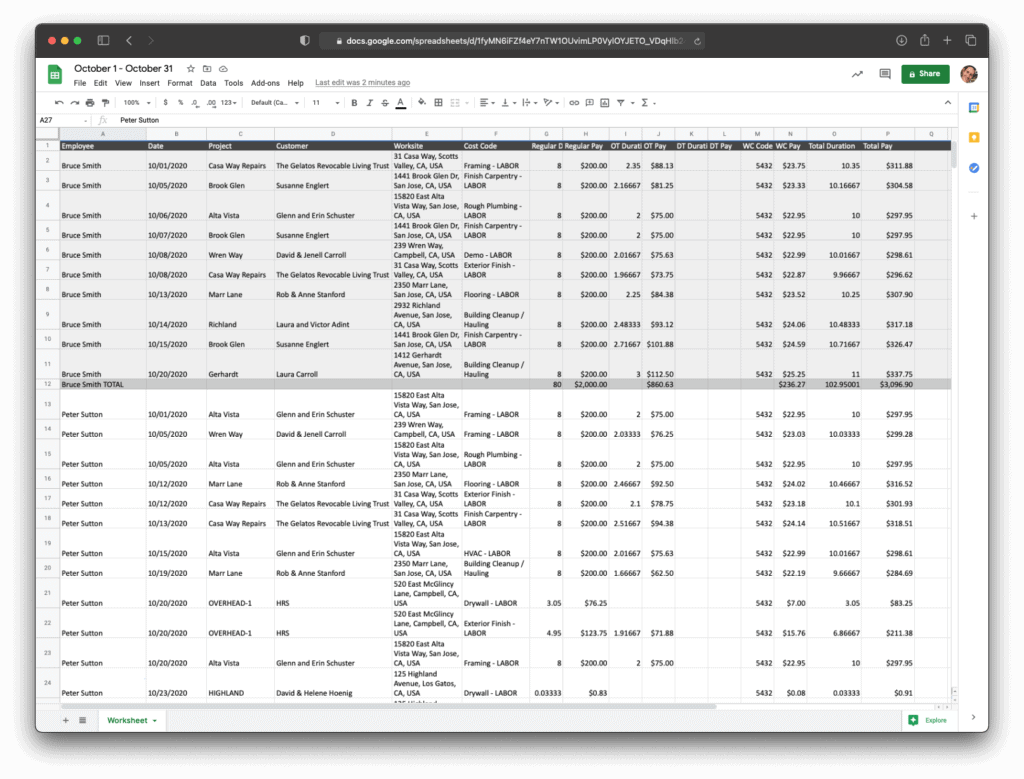
- Implement a spreadsheet that allows you to paste in the raw data and then uses pivot tables and charts to summarize how you are tracking
- Implement construction cost tracking software that automatically captures the data for you and provides in-built reporting.
The most important aspect here is making sure you have a system that is regularly fed the latest data and it takes you minutes to get the critical insights you need on how your costs are tracking.
For teams running QuickBooks, a time tracking app for QuickBooks that feeds verified labor hours directly into your accounting system removes the biggest manual step between field data and your cost reports.
3. Build A Cadence For Regular Analysis Of Costs
It’s easy to get caught up in solving project issues on the ground and lose track of whether your costs are tracking to plan. That’s why it’s important to build a regular cadence for analyzing project costs.
Set up a recurring meeting with the key people on the project you feel need to understand how costs are tracking. Compare actual costs to what you budgeted, where there are discrepancies discuss what can be done to counter the overruns.
The right construction accounting software can make those cadence meetings far more productive by generating the cost variance reports you need automatically, rather than requiring someone to compile data manually before each review.
4. Review Your Construction Cost Reports After the Job
Once a project is complete, take the time to carefully review your cost reports and ask the following questions:
- Which components went to plan and why?
- Where did the overruns happen and why?
- Where did we overestimate?
These insights form the basis of a mechanism of continuous improvement on your bids. If your post-project review reveals gaps in how costs were allocated during the job, our guide on how to calculate job costs walks through how to build a more complete and accurate cost baseline for future projects.