



Construction management software now covers a wide range of jobs. Some tools manage bids, drawings, and RFIs for large general contractors, others handle residential client communication, and others automate the field labor and cost tracking that keeps jobs profitable. Choosing the wrong category for your business is the most common mistake contractors make when shopping for construction workforce management tools or construction project management software.
We evaluated the best construction management software on the market against real contractor needs: crew size, job complexity, budget, and what each tool is actually built to do. This isn’t a top 10 construction management software list padded to hit a round number. Below, you’ll find eight options worth considering, what each one does best, current pricing, and honest tradeoffs for each, drawn from construction management software reviews on Capterra and the App Store.
Many contractors comparing these tools are really asking about pricing and tradeoffs, not just features: a comparison of Procore Buildertrend feature sets, Buildertrend Autodesk workflow differences, and Procore Autodesk deployment scope came up repeatedly in our research. We address those directly in the sections below.
List of best construction management software
| Software | Job costing | Field time tracking | Scheduling | Starting price |
|---|---|---|---|---|
| Workyard | Real-time, by cost code | GPS-verified, automatic | Visual crew scheduling with a live location map | Get a quote |
| Procore | Yes, budget forecasting | Mobile time cards | Integrated, auto-synced across teams | Custom quote |
| Buildertrend | Yes, budget tracking | Mobile clock in/out | Gantt, list, and calendar views | Custom quote |
| Autodesk Construction Cloud (Build/Forma) | Yes, cost management module | Manual daily log entry, no native GPS clock | Syncs with Primavera P6 and Microsoft Project | From $100/user/mo |
| Contractor Foreman | Yes, basic | GPS time cards | Gantt chart with baseline tracking | $49/user/mo |
| JobTread | Yes, tied to estimates | Basic clock in/out | Task-based Gantt view | $199/mo + $20/user |
| Fieldwire | No | No | Gantt chart with manpower view | Free tier; $39/user/month for Pro |
| Planera | No | No | Full CPM engine with look-ahead plans | Custom quote |
How we chose
We narrowed this roundup to eight products that pass a real construction use-case test, checked against current pricing and review pages. See our full review methodology for scoring details.
How to choose the best construction management software
Pick construction management software by matching it to the specific job it needs to do, not just its category. Construction management software covers everything from project coordination to field labor and job costing, and it isn’t the same as broader construction project management. That decision usually sits with a business owner or a manager closer to the field, and these factors narrow it down.
- Who owns the decision. A project manager juggling drawings, RFIs, and trade partners weighs different features than a construction operations manager focused on crew time, labor cost, and compliance.
- Project scope and complexity. A $5M commercial GC with a dozen subs needs different tools than a five-person residential crew.
- Where you lose the most money today. Payroll padding, unallocated labor hours, or late job costs point to field labor and job costing tools, not just scheduling.
- Crew size and mobility. Software for construction management that relies on office staff entering data manually breaks down once crews are spread across job sites.
- Existing accounting and payroll stack. Check integration with Sage, QuickBooks, or ADP before committing, since re-keying data defeats the point.
- Budget. Construction management software pricing runs from about $6 per user per month to five figures a year. Match spend to what the software replaces.
When pricing Procore against a lower-cost tool, remember its custom quotes usually assume enterprise-scale deployments. Most cloud based construction management software built for smaller crews, like Workyard, Contractor Foreman, and JobTread, publishes a starting rate you can budget against before a sales call.
For roofing contractors, check out our roofing contractor software comparison.
What is the best construction company management software?
There’s no universal answer, since “best” depends on what you’re managing. Contractors protecting margins through field labor, job costs, and compliance get the most from Workyard, the strongest construction operations platform on this list.
General contractors coordinating drawings, RFIs, and trade partners on large commercial jobs need Procore or Autodesk Construction Cloud, residential and specialty contractors get more from Buildertrend or JobTread, and crews that mainly need plan markup and punch lists fit best with Fieldwire.
8 of the best construction management software options
Here’s a closer look at each option, based on current pricing, features, and verified reviews.
1. Workyard – Best overall construction operations platform
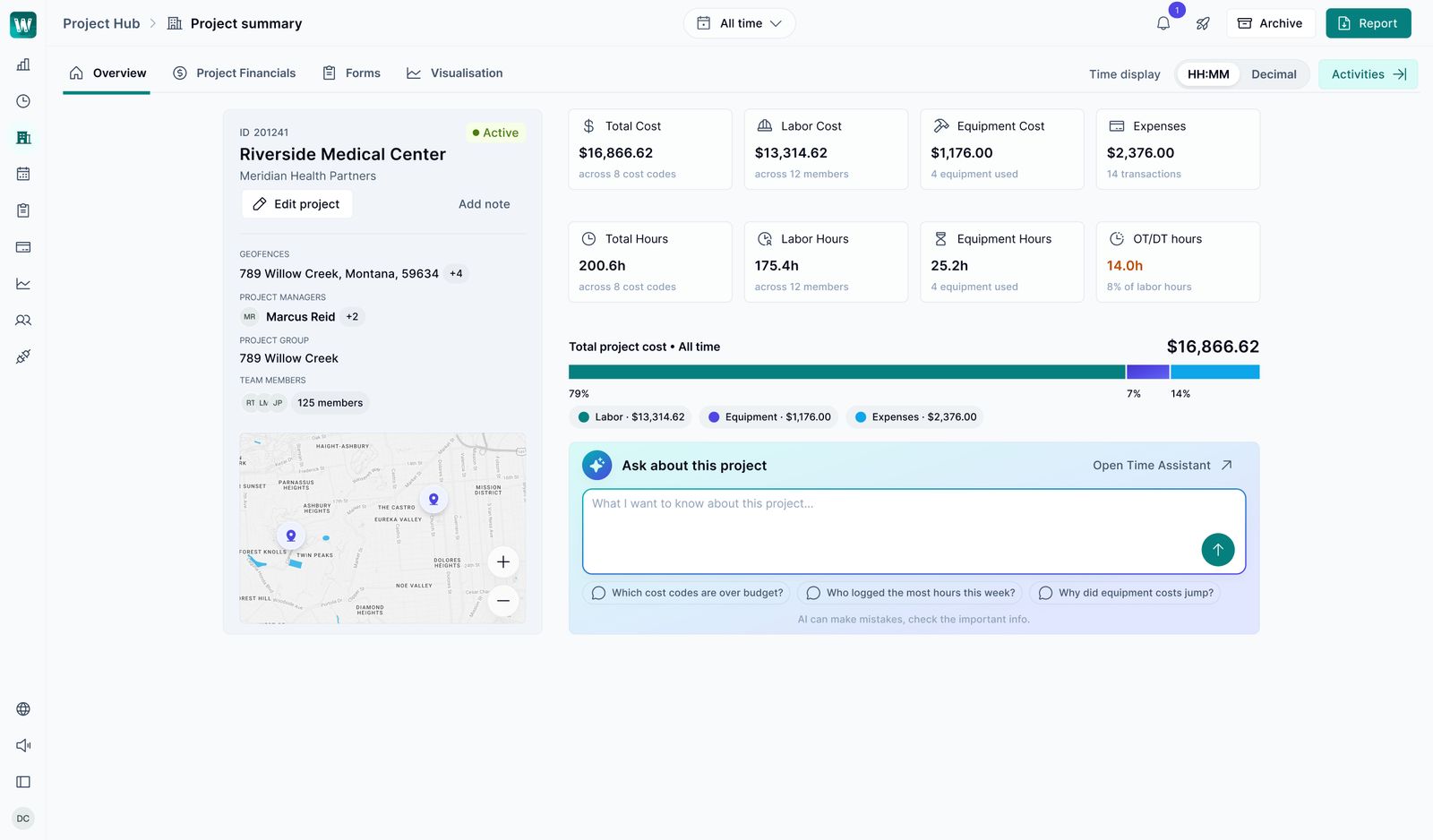
Workyard is the construction operations platform for contractors who need to protect job margins by automating the work around every job: capturing GPS-verified field time, coding labor to the right cost codes, and keeping compliance and payroll data clean. Unlike project-management suites built around drawings, bids, and RFIs, Workyard is built around the crew and the numbers that determine whether a job makes money. It fits general contractors and specialty contractors alike.
A general manager at a property management and development firm put it this way: “We’ve improved leaps and bounds in the accuracy of our job costing analysis. We can present a complete bill to clients with an audit trail.” That’s what separates a construction operations platform from a basic time clock. Workyard’s expanding automation capabilities have also earned outside recognition, including a feature in Capterra’s construction AI report.
Features
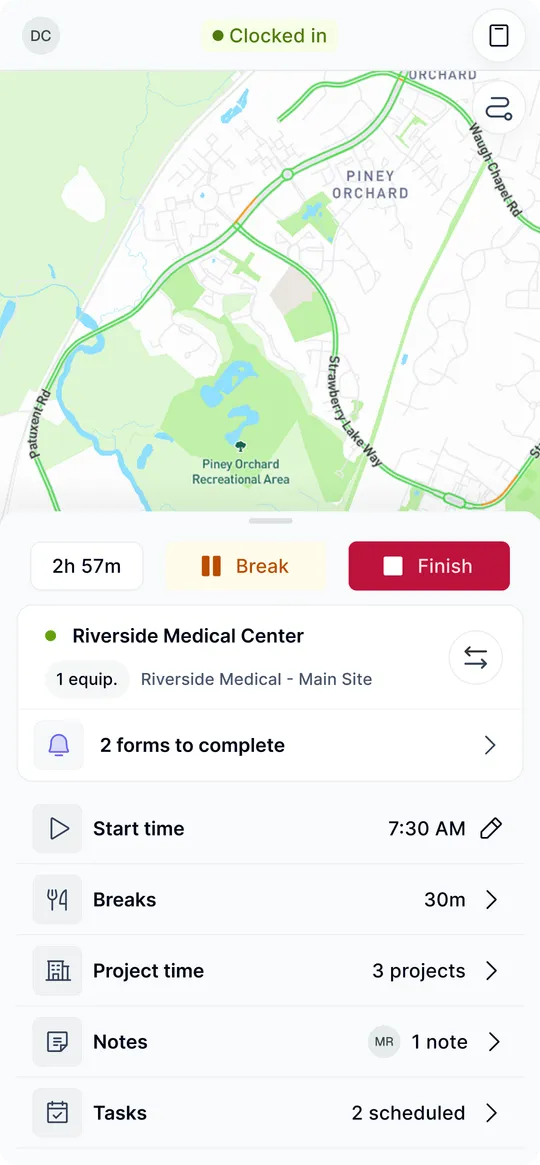
- GPS-verified time clock with automatic geofenced clock-in and clock-out
- Real-time job tracking and job costing by cost code
- Visual crew scheduling with a live location map
- Field job management with photos, notes, and crew updates
- Labor compliance tools and custom forms for overtime and breaks
- Native integrations with QuickBooks, Sage Intacct, ADP, Gusto, Paychex, and Rippling
- Timekeeping Agent, an AI tool for cleaning up time entries in natural language, plus reporting on labor trends
See our guide to AI agents in construction.
GPS time clock and Autopilot
Workyard’s GPS time clock tracks crew arrival and departure automatically, using geofenced boundaries instead of relying on a worker to remember to clock in. It’s available as a mobile app, a kiosk for shared tablets, and supervisor-led entry for crews without phones, removing two common sources of payroll error: buddy punching and rounded start times.
Job costing
As soon as a crew member submits a time card, Workyard codes that labor to the right job and cost code automatically, based on GPS rules set up in advance. Job costs update in real time instead of arriving weeks late, letting a manager catch an overrun mid-job.
Pricing
Whether you’re running a small crew, medium-sized team or enterprise scale contracting business, Workyard is built to protect your margins. Get a custom quote from a Workyard specialist over a 30 minute call.
Pros and cons
Pros
- GPS-verified time cards eliminate most payroll disputes
- Real-time job costing, not end-of-month reporting
- Simple for field workers, low training overhead
- Native payroll and accounting integrations reduce re-keying
Cons
- Does not manage drawings, RFIs, submittals, or bids
- Field crews need brief onboarding on GPS clock-in
- No native sync with external calendars
- Custom pricing, so getting a price takes a call
Ratings
Workyard’s strongest scores come from Capterra and G2, where contractors who’ve actually run it on jobs leave the most detailed reviews.
Ratings captured at October 14, 2026.
Ready to see it on your own jobs? Book a demo or start a free trial.
2. Procore – Best for large-scale general contractor project management
Procore is built for general and specialty contractors, public agencies, and civil and infrastructure firms running large, multi-stakeholder projects. It centers on scheduling, RFIs, submittals, drawings, and project correspondence, giving trade partners and field teams a shared system for tracking task-level progress against a master schedule.
Procore’s mobile time clock lets crews log hours with cost codes and task details, but its core strength is project coordination rather than field labor automation. It integrates with Oracle, Sage, Workday, Microsoft Project, and Primavera, which makes it a common choice on jobs where multiple systems already need to talk to each other.
Features
- Integrated scheduling with automatic synchronization across teams
- Project correspondence and RFI management with mobile access
- Task tracking by name, assignment, and duration
- Mobile time tracking with a single view of team time cards
Pricing
Pricing Procore requires a sales call: it uses custom pricing based on company type, project volume, and size. No public self-serve tier is available, and a sales demo is required to get a quote.
Pros and cons
Pros
- Strong onboarding and dedicated support
- Deep RFI, submittal, and drawing management
- Wide third-party integration list
- Strong stakeholder collaboration tools
Cons
- High cost relative to smaller contractors’ budgets
- Limited field labor automation compared to dedicated time-tracking tools
- Steep learning curve for non-technical field staff
- No public pricing, so budgeting requires a sales call
Ratings
Procore’s ratings are strong across enterprise-focused review platforms, though feedback varies by role.
Ratings captured at October 14, 2026.
See our full Procore review for a closer look at its features, pricing, and the jobs it fits best.
3. Buildertrend – Best for residential homebuilders and remodelers
Buildertrend is a residential construction management platform serving homebuilders, remodelers, and specialty and commercial contractors, with a strong focus on client-facing communication. It supports scheduling in Gantt, list, and calendar views, tied directly to to-do lists, change orders, and RFIs.
Its mobile app allows crews to clock in and out, and Buildertrend integrates with QuickBooks and CRM tools like HubSpot and Salesforce. In a Buildertrend Autodesk comparison, the difference is scale and focus: Buildertrend leans into homeowner communication, while Autodesk leans into BIM and design coordination for larger commercial teams.
A Buildertrend contractor typically runs smaller residential jobs than the general contractors who choose Procore or Autodesk Construction Cloud. Buildertrend moved to a fully custom quote model in 2026, so a builder now has to complete a sales form and share their annual construction volume before seeing a number.
Features
- Scheduling with real-time stakeholder notifications
- Centralized daily logs with progress photo attachments
- Customizable checklists with automatic reminders
- Warranty document and claims management
Pricing
Buildertrend no longer publishes fixed tiers. Pricing is a custom quote based on builder type and annual construction volume.
Pros and cons
Pros
- Strong client communication and homeowner portal
- Good customer support reputation
- Reliable uptime according to user reviews
- Built-in warranty and change order tools
Cons
- Expensive relative to smaller residential builders’ budgets
- Users report a difficult setup process
- Frequent interface updates frustrate some long-time users
- Time tracking is basic compared to dedicated field labor tools
Ratings
Buildertrend rates well overall, though some reviewers cite recent interface changes as a pain point.
Ratings captured at October 14, 2026.
See our full Buildertrend review for a closer look at its scheduling, customer portal, and pricing.
4. Autodesk Construction Cloud (Build/Forma) – Best for BIM-driven design-to-build coordination
Autodesk Construction Cloud, including Autodesk Build and Forma, is built for general and specialty contractors, project owners, and designers who need BIM collaboration alongside project management, bidding, and RFI workflows. It’s often the choice for teams already working in Autodesk’s design ecosystem.
Autodesk manages RFIs, automates submittal logs, and connects meeting minutes and correspondence across the project lifecycle. It pulls schedule data into cost management tools and integrates with tools like Asana, Airtable, QuickBooks Desktop, and Raken, but field labor tracking is limited compared to dedicated time and job-costing tools.
Features
- Schedule integration with external systems like Primavera P6 and Microsoft Project
- RFI management with customized workflows
- Automatic submittal log generation
- Centralized construction meeting minutes and correspondence
Pricing
- Forma Build Essentials: $100 per user/month, paid monthly, for core field and data management tools
- Forma Build (per user): $175 per user/month for fuller project and cost management capabilities
- Forma Build (unlimited users): Contact Autodesk’s sales team for pricing.
Both published tiers offer lower rates on annual and 3-year terms.
Pros and cons
Pros
- Deep BIM and design-file collaboration
- Strong RFI and submittal automation
- Good integration with other Autodesk design tools
- Established in large commercial and civil projects
Cons
- High cost per user, especially for larger teams
- No native GPS time clock; field hours are logged manually through daily reports or a third-party integration like Rhumbix
- Administration is difficult to manage across many projects and users
- Reported sync issues switching between WiFi and mobile data
Ratings
Autodesk now lists what was Autodesk Construction Cloud under the Autodesk Forma name across the App Store, Google Play, and Capterra, where it’s reviewed as a comprehensive construction management suite.
Ratings captured at October 14, 2026.
For more project management suites beyond Autodesk, see our roundup of construction project management tools.
5. Contractor Foreman – Best budget-friendly all-in-one option
Contractor Foreman is a construction management platform aimed at small and mid-sized contractors who want project tracking, job costing, and workforce management in one affordable tool. It covers scheduling with Gantt charts, percentage-based progress tracking, and a client portal for change orders and invoicing.
Contractor Foreman 2026 pricing remains one of the lowest-cost options in this category, with time cards that include GPS details on clock-in and clock-out. It integrates with QuickBooks, Outlook 365, Stripe, Google Calendar, and Gusto, which covers most of what a small contractor’s office already runs.
Features
- Gantt chart project scheduler with baseline tracking
- Percentage-based progress tracking with Kanban views
- Time cards with GPS clock-in and clock-out details
- Client portal with payment integration
Pricing
- Basic: $49/month
- Standard: $105/month
- Plus: $166/month
- Pro: $221/month
- Unlimited: $332/month
Pros and cons
Pros
- Lowest entry price on this list
- Broad feature set for the price point
- Good search functionality across projects
- Unlimited storage across all tiers
Cons
- Users report slow performance and occasional bugs
- Customer support response times draw complaints
- Requires significant onboarding to use fully
- Photo and file uploads can lag on slower connections
Ratings
Contractor Foreman rates well for value across app stores and review sites alike, with most complaints centered on performance rather than features.
Ratings captured at October 14, 2026.
See our full Contractor Foreman review for a closer look at its time tracking, scheduling, and pricing.
6. JobTread – Best for estimating-to-job-costing workflows
JobTread is a construction management platform for residential and specialty contractors that ties estimating, budgeting, and job costing together in one system. It’s built around a workflow where an estimate becomes a live budget, and actual costs get tracked against it as the job progresses.
Where JobTread stands out is its unlimited jobs, documents, and vendor and customer portal users on every plan, with per-user pricing that only applies to internal office staff. That makes it a fit for contractors who want their estimating and job costing in the same system without paying more as subcontractors or clients get added to a job.
Features
- Estimating tied directly to live job budgets
- Job costing by budget line and cost category
- Unlimited customer and vendor portal access
- Pre-built job templates and data import tools
Pricing
- Monthly plan: $199/month for the first internal user, plus $20/month for each additional user
- Annual plan: $159/month
Pros and cons
Pros
- Estimating and job costing built as one continuous workflow
- Unlimited free portal access for vendors and clients
- Free implementation and training included
- No setup fees or long-term contract required
Cons
- Base price plus per-user fees can add up for larger offices
- Smaller review base than more established competitors
- Field time tracking is basic compared to dedicated GPS tools
- Less brand recognition than Procore or Buildertrend among larger GCs
Ratings
JobTread doesn’t have a native app in the App Store or Google Play; contractors install it as a progressive web app straight from their phone’s browser instead. Its Capterra and G2 scores come from a smaller pool of reviewers, but the satisfaction runs high.
N/AApp Store
N/AGoogle Play
5.00G2 · 99 reviews
Ratings captured at October 14, 2026.
7. Fieldwire – Best for field-first plan markup and punch lists
Fieldwire, now part of Hilti, is built around getting drawings, task lists, and punch lists into the hands of field crews on a tablet or phone. It’s less a full construction management suite and more a focused field coordination tool that plugs into a broader project management stack.
Crews can mark up plans, track punch list items to completion, and share updates in real time, which makes Fieldwire a common companion tool alongside Procore or a similar PM platform rather than a full replacement for one. It doesn’t include job costing or payroll-facing time tracking.
Features
- Plan viewing and markup optimized for tablets and phones
- Task and punch list management with photo attachments
- Real-time updates between field crews and the office
- Free tier available for small teams and single projects
Pricing
- Basic: Free for up to 5 users, 3 projects, and 100 sheets
- Pro: $39/user/month (billed annually)
- Business: $64/user/month (billed annually)
- Business Plus: $89/user/month (billed annually)
Pros and cons
Pros
- Fast, field-friendly plan markup and punch lists
- Free tier available for small projects
- Simple enough for crews to adopt with little training
- Backed by Hilti’s ongoing investment
Cons
- No job costing or field labor time tracking
- Advanced features require higher-tier plans
- Limited customization compared to full PM suites
- Works best paired with a separate scheduling or job-costing tool
Ratings
Fieldwire’s App Store rating sits on just 16 reviews, so its 4.4 on Google Play, backed by nearly 5,000 ratings, is the better gauge of how the app actually performs for crews using it daily.
Ratings captured at October 14, 2026.
See our full Fieldwire review for how field data flows differently between Fieldwire and Workyard, or our list of Fieldwire alternatives.
8. Planera – Best for CPM scheduling and look-ahead planning
Planera is a cloud-based scheduling platform built around the critical path method (CPM), the sequencing logic that large commercial and infrastructure schedules run on. It replaces a desktop scheduling file with a visual, collaborative canvas that a scheduler, superintendent, and subcontractors can work from together.
Planera’s engine handles predecessor and successor relationships, multiple relationship types, and float calculations, then slices the master schedule into short-interval look-ahead plans for the field. It imports and exports Primavera P6 and Microsoft Project files and connects natively with Procore and Autodesk Construction Cloud, making it a common companion to a broader project management suite rather than a replacement for one.
Features
- Full CPM scheduling engine with predecessor/successor logic and float calculations
- Visual scheduling canvas alongside a standard Gantt chart view
- Look-ahead planning that breaks the master schedule into field-level plans
- Manny, an AI scheduling assistant that answers questions about the live CPM schedule
- DCMA quality checks and Monte Carlo risk simulation on higher tiers
- Native integrations with Procore and Autodesk Construction Cloud, plus P6 and Microsoft Project import/export
Pricing
Planera does not publish fixed tiers. Pricing is a custom quote based on portfolio size, with unlimited users included at every level; higher tiers add DCMA quality checks, Monte Carlo risk simulation, resource loading, and portfolio dashboards. A demo is required to get a number.
Pros and cons
Pros
- Purpose-built CPM engine, not a generic Gantt tool adapted for construction
- Visual canvas makes schedule logic easier for a full team to follow
- Manny’s AI assistant can answer schedule questions without a dedicated scheduler on call
- Unlimited users included at every pricing tier
Cons
- No job costing or field time tracking of its own
- Custom pricing only, so budgeting requires a sales call
- Best suited to teams already running CPM schedules, not a fit for simple residential jobs
- Limited independent review coverage on major software review sites as of September 2026
Ratings
Planera has no App Store, Google Play, Capterra, or G2 listing with a published star rating yet, which reflects how new the vendor is relative to the rest of this list rather than anything about how it performs.
No ratings yetApp Store
No ratings yetGoogle Play
No reviews yetCapterra
No reviews yetG2
Ratings captured at October 14, 2026.
Planera is best for general contractors and specialty contractors running CPM schedules who need a visual, collaborative way to build and update them alongside Procore or Autodesk Construction Cloud.


Final recommendation
If you need one system to protect job margins by automating field labor, job costing, and compliance, Workyard is the strongest overall pick. If you’re coordinating large commercial builds, pair Workyard’s field data with a suite like Procore or Autodesk Construction Cloud.
Residential builders should look at Buildertrend or JobTread, crews that mainly need plan markup should consider Fieldwire alongside a broader system, and teams running detailed CPM schedules should look at Planera. The best construction company management software is the one built around where you actually lose money. Compare the best AI construction tools.