


Medium business · 21–100 employees
Add crews without adding chaos
Workyard takes timesheet chasing, re-keying and payroll cleanup off your office, and keeps every crew, verified hour and job cost in view as you grow.
Sound familiar?
What breaks when the crew gets bigger
The problem
“We pay for a guy that pretty much all day Monday, it’s all he does is just fix the hours.”
The solution
Payroll in minutes, not Mondays
Hours arrive GPS-verified, coded to the job, with forgotten clock-outs already trimmed and ready for QuickBooks, Sage or your payroll. Nobody spends Monday cleaning them up.
The problem
“It’s impossible for us to get out to every site every day.”
The solution
See every site without driving to it
Live Locations shows who’s on the clock and at which job, and every punch is checked against the job’s geofence, so you know the hours are real.
The problem
“At the end of the month… did we make any money or not.”
The solution
Job costs while the job is running
Every hour lands on its job and cost code as the day goes, so you see what each job is costing in week one, not at month-end.

The payoff
Why growing contractors choose Workyard
1 hour
to prepare payroll at TruTek, down from 8
Hours arrive verified and coded, so the office approves instead of fixing.
$5,000
saved a week at Synaptic Solar
Job costs showed where each job was losing hours: about five fewer visits a job.
30%+
more client reimbursements at Earned Run
Every hour on its job, with the record to bill it.

Mainsail Painting grew 6x without losing track of a job
At 15 painters, paper time cards stopped keeping up: rounded hours, jobs they couldn’t bill properly and days spread across too many sites. With hours and job costs in Workyard, the Cape Cod company grew six times over.

How it works
What changes when you switch
Money
Only pay for the hours worked
The geofence clocks crews in. No app to open, nothing to type or round.
Each worker's own PIN and a face photo at the kiosk. Buddy punching has nowhere to hide.
The agent fixes the clock-out from the geofence exit and flags it for a one-tap approval.
$1,000+
caught in payroll errors in the first week · TruTek
Explore more:
Margin
Protect every job’s margin
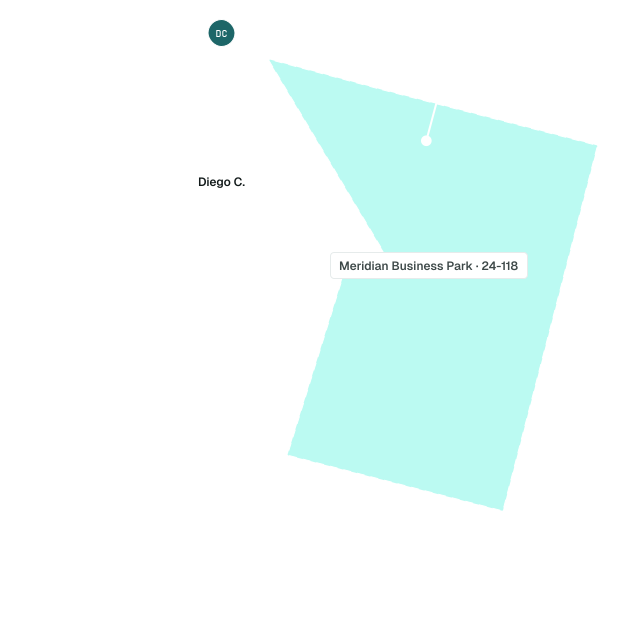
Diego’s morning codes to 24-118 the moment he clocks in, not at week’s end from memory
The 32-minute drive to Fairview codes to 27-203. The $214.60 receipt codes to Materials.
A crew running heavy on rough-in shows up Tuesday afternoon, not on the invoice.
$260K
saved per year with live job costing · Synaptic Solar
Explore more:
Fairview Clinic · 27-203
Live
Labor today · as of 4:46 PM46.5 h
- Rough-in24.0 h
- Conduit & wire16.5 h
- Trim & fixtures6.0 h
- Materials$214.60
Control
Keep every workday on track without the chase
Directions, crew list, start time. Move a crew and the plan follows. No text threads.
The JSA when a crew lands on site, the daily at shift end, a ticket at every service stop
Who’s on site, who’s driving, what’s filed and what’s still open. Without a call.
100s of hrs
saved a week routing supervisors by proximity · Accord Group
Explore more:




Will my crew actually use it?
Thousands already do, every day
Less work for your crew
GPS and AI drive the capture and correction, so they don't have to.
Field-proof
Works offline and in Spanish, prevents buddy punching, and corrects mistakes as they happen
Protects their privacy
Location is only shared while on the clock, never after hours. You choose the level of tracking that fits your crew.

"I love this app. It makes it so easy for me to clock in and clock out and it tracks my mileage for my work and everything. I would recommend it, great way to keep up with everything."
Jezz "By far the best app I've ever used for work. Most consistent and accurate. Haven't had any difficulties at all. I will never use another app for clocking my hours at work."
R.H. "This app is extremely easy for my construction staff to use. It creates reports for me that show different costs by projects and honestly just saves me time and headaches."
Lucas

AI that does the work. You approve.
Other tools wait for someone to do the work. Workyard’s agents check every timecard and flag only what needs you. That’s the whole job.
Ask Workyard
NewFrom quick answers to hours of work, handled
- Answers about any crew, job or timecard
- Builds the schedule the way you run your crews
- Sweeps a whole pay period in one request
Timekeeping Agent
Time tracking that runs itself
- Clocks crews in and out, verified by GPS
- Codes every hour to the right project automatically
- Finds problem timecards and drafts the fix when you ask
Reporting Agent
NewReports you need, without the spreadsheet work
- Upload a report, or describe one
- Custom reports filled with live Workyard data
- Excel, CSV or PDF, ready to send
Straight answers
What growing contractors ask us
Our crews aren’t tech-savvy. Will they actually use it?
Yes, because it asks very little of them. A geofence can clock them in when they arrive on site, or remind them to. Clocking in by hand is one tap, the app runs in English or Spanish, and it keeps working with no signal. Anyone without a phone clocks in at a kiosk or with their foreman.
TruTek tested Workyard with one crew, then had all 120 employees on it within two weeks.
Will it sync with our payroll and accounting software?
Yes. Approved hours go out by employee, job and cost code, with overtime already worked out, so nobody retypes a time card:
- Payroll: QuickBooks Online and Desktop, ADP RUN and Workforce Now, Gusto, Paychex, Paylocity, Paycor and Rippling.
- Accounting and ERP: Foundation, Sage 100 Contractor, Sage 300 CRE, Sage Intacct, Spectrum, ComputerEase, Acumatica and NetSuite.
Systems with a connector also send your jobs, cost codes and employees in. Not on the list? The API or a file in your system’s format connects it.
How do I know crews are actually on site and the hours are real?
Every punch is checked against GPS and the job’s geofence. You can allow clock-in only inside the fence, and punches made away from it are flagged on the time card. A forgotten clock-out can be trimmed back to when the worker left the job, and a kiosk punch needs the worker’s own PIN and can take a photo. Live Locations shows who’s on the clock, and at which job, right now.
How much office time will it actually save?
The hours that go into chasing and fixing time cards. Hours arrive GPS-verified and coded to the job, forgotten clock-outs are trimmed for you, and approved time goes to payroll in a couple of clicks.
TruTek went from a full eight-hour day on payroll to under an hour. TruControls cut payroll prep from four hours to about 45 minutes, with 90% fewer timesheet corrections. How payroll prep works.
What does it cost, and are we locked into a long contract?
It’s a per-user license fee for the people who track time, set by your plan and setup, and a 30-minute call gets you your exact price. There’s no long contract to sign: pay monthly or annually, with a discount for annual.
If your headcount swings through the year, tell us and we build it into the quote, so you aren’t paying for a winter crew you don’t have. Compare plans.
How long does setup take for a company our size?
Days, not months. Your jobs, cost codes and employees come in from your accounting system, so nothing is rebuilt by hand, and a real person walks your office through setup and the first pay period.
Start with one crew, check a week of real hours, then bring everyone on. That’s how TruTek did it: one crew in the first week, all 120 employees live within two weeks. Read the TruTek story.
We’ve been burned by software before. Can we prove it on our own jobs first?
Yes. Start a free trial with a crew on real jobs, and see the payroll sync run on your own data before you sign. If your setup is unusual, like several company files or a custom payroll format, we can run a test export first.
You judge the adoption and the hours, not the pitch, and whoever signs off gets numbers from your own crews to decide on.
Is it worth paying more than a basic time clock?
Judge it by what it stops costing you. A basic clock records whatever your team remembers to enter. Workyard checks every punch against GPS, codes it to the job and catches missed punches before payroll.
TruTek found over $1,000 in payroll errors in its first week, and Synaptic Solar saves about $5,000 a week on payroll and job costs. Bring your headcount and payroll hours to the call and we’ll work through the numbers with you.
Will every hour land on the right job and cost code?
The job, yes; the cost code is your call. In Automatic mode the geofence puts time on the job the worker is standing on, so a four-stop day comes back split four ways. The cost code comes from the worker, picking from that job’s codes, from the foreman for the whole crew, or from a default so there’s nothing to pick. Hours reach job costs as each shift ends.
Can I see what a job is costing before it’s finished?
Yes, as of the last shift that ended. Each job’s labor and equipment hours and cost update by cost code as shifts end, with overtime priced in. Managers can be limited to their own jobs, and pay rates stay with admins.
What it doesn’t do is compare against your budget or estimate. That stays in your estimating system, and you check it against this week’s number instead of last month’s.
Can foremen and PMs approve hours before payroll?
Yes. Each worker has a time approver, such as their foreman, and project managers can approve the time on their jobs. Cards arrive with problems flagged, like a clock-in before reaching the site or a skipped photo, so approvers check the exceptions instead of every line. The office approves anything still open, one card or a whole crew at once, and every edit is logged with who made it, when and why.
Some of our guys don’t have smartphones. How do they clock in?
Mix and match. A kiosk on a company iPad takes each worker’s own PIN, and a photo if you want one, and keeps working without signal. A foreman can clock in the whole crew from one phone, and each worker still gets their own time card. Anyone who carries the app clocks in on their own phone, with GPS on their punches.
Our guys don’t want to be tracked. Is location on all the time?
No. Location is recorded only while a worker is on the clock, never after clock-out, at night or on weekends, and every worker can see that in the app. You set the level per crew: through the shift, only at clock-in and clock-out, or off. A crew with tracking off can still clock in at a kiosk with a PIN. How we protect worker privacy.
Will it alert me when someone doesn’t show up or leaves early?
No. Workyard doesn’t send alerts for no-shows, arrivals or someone leaving a site. Instead, Live Locations shows who’s on the clock and at which job, so a look first thing tells you who’s missing, and Time Cards can list everyone with no time card that day. Leaving a geofence doesn’t end the shift, and punches made away from the site are flagged on the card.
Can it replace our whiteboard for scheduling crews?
Yes. Drag people or whole crews onto jobs on one board, by day, week or month. Each worker sees their tasks in the app they clock in with: the job, start time, directions, checklist and plans, with a push when anything changes. Each PM can schedule their own jobs on the one company board. It isn’t a Gantt chart or a manpower forecast. Scheduling comes with the Max plan.
We do prevailing wage work. Can it handle certified payroll?
Partly, and here’s the line. Hours are coded by job and cost code, and the teams on prevailing-wage work can be exported as their own batch, so public and private work stay apart. Your payroll or certified payroll system applies the prevailing rate and produces the WH-347. Workyard doesn’t calculate prevailing wage or generate certified payroll reports. How payroll export works.
Does it handle overtime, breaks and California’s rules?
Yes. Give each worker their state’s overtime preset, such as California’s daily overtime and double time, or Colorado, Nevada, Minnesota and federal rules, or describe your own in plain English. California and Washington companies can turn on the state’s break rules, with rest and meal reminders, and on the Max plan workers confirm their breaks when they sign off at clock-out. Premium pay for a missed meal stays with payroll. Labor compliance.
Can it handle more than one pay rate, drive time or per diem?
Pay rates usually don’t need to live in Workyard. It sends every hour to your payroll or ERP already coded by job and cost code, so that system applies the right rate for the job, task or classification, prevailing and union rates included. Workyard keeps one rate per worker for its own job cost figures.
Drive time, yes: drives between jobs are on the clock, and your rules put them on the next job, split them across the day or give them their own cost code. They count toward overtime like any other hour. Per diem isn’t in Workyard.
Can daily reports and safety forms live in the same app?
Yes. The app your crew clocks in with also runs daily reports, JSAs, inspections and your own forms, and you can make them due on arrival or at clock-out so nobody skips them. The daily fills in the crew’s hours from their time cards, photos file to the job, and the daily works offline. Daily reporting, safety and forms come with the Max plan.
What happens on sites with no cell signal?
Nothing changes for the crew. The app keeps tracking offline and syncs when the phone finds a connection, and a kiosk holds punches and photos on the iPad the same way. Nobody loses a day’s hours to a dead zone. One exception: a brand-new worker’s very first kiosk clock-in needs a connection.

Whatever size you are, see it on your own jobs
A 30-minute walkthrough with a Workyard specialist: your crew, your systems, your quote.