


 (650) 332-8623
Best Connecteam Alternatives in 2026
Connecteam wasn’t built for jobsites. See 7 alternatives, Workyard, ClockShark, busybusy, Homebase, When I Work, Deputy, and Sling, compared on cost and job costing.


Quick Answer
Workyard is the best overall Connecteam alternative for contracting businesses: continuous GPS, automatic job costing by cost code, and direct payroll export. Starting at $6/user/month.
Best runners-up: ClockShark for simple GPS time tracking and scheduling in one app ($40/mo base + $9/user/month), and busybusy for a genuinely free tier that still includes job costing (paid plans from $9.99/user/month, billed annually).
Disclosure: Workyard, the company publishing this review, also makes one of the products reviewed here. Every tool below, including Workyard, was scored against the same criteria using our published review methodology.
Connecteam is built for deskless teams broadly, not for jobsites specifically, and it sits outside true construction workforce management tools built around jobsites and cost codes.
It has no job costing, no cost-code allocation, and GPS that only checks location at clock-in and clock-out, gaps that show up fast for contractors running crews across several jobsites in a week.
Our full Connecteam review covers the product on its own. This piece looks at how it stacks up against its competitors in construction specifically.
In this roundup, we compare seven Connecteam alternatives on what matters most for jobsite crews: GPS behavior, job costing, and what happens when a crew loses signal out in the field.
List of the best Connecteam alternatives
| Brand | GPS time tracking | Job costing | Team scheduling | Starting price |
| Workyard | Continuous, automatic job detection | Automatic, by job and cost code | Crew-based, same app as clock-in | $6/user/mo |
| ClockShark | GPS with geofencing (GPSFence) | By job, not by granular cost code | Employee-based, drag-and-drop | $40/mo base + $9/user/mo |
| busybusy | Included on the free tier, works offline | Included on the free tier, plus equipment tracking | Pro tier and up | Free; paid plan from $9.99/user/mo (annual) + $40 admin license |
| Homebase | Clock-in and clock-out only, Essentials tier up | None; tracks labor cost against sales instead | Per location; AI-assisted on Plus | Free, 1 location, up to 10 users; paid plan from $24/location/unlimited users, billed annually |
| When I Work | None; requires connectivity to clock in | None | Auto-scheduling, multi-week and multi-location | $2.50/user/mo |
| Deputy | Yes, plus a biometric face-unlock option | None; built around compliance instead | Demand forecasting built in | $5/user/mo, billed annually |
| Sling | None at any tier | None | Free for up to 30 users | Free (Premium $1.70/user/mo, billed annually) |
How we chose
We researched each tool’s own pricing page, app store listings, and verified reviews against three criteria: GPS accuracy and behavior, job-costing depth, and offline reliability. Full criteria are on our review methodology page.
How to choose the best Connecteam alternative
The right Connecteam alternative comes down to whether your crew’s core problem is job costing or shift scheduling. Once you know which one matters more, the checklist below narrows things down fast.
- Choose job costing over a company newsfeed if you bill by labor hour and cost code. Connecteam and most of its direct competitors have no cost-code allocation at all.
- Check GPS behavior, not just GPS presence. Connecteam only checks location at clock-in and clock-out. Contractors field multiple crews across jobsites in a day, and that movement needs continuous tracking, not two location snapshots.
- Price the whole stack. Hub-based pricing (Connecteam) and location-based pricing (Homebase) can look cheap at ten users and pricey at fifty.
- Confirm your accounting and payroll integrations are native, not a CSV export you’ll be fixing by hand. Check our time tracking integrations guide, or the Gusto, Sage, and Paychex breakdowns, before assuming support.
- Ask what happens with no signal. Basements, rural sites, and new builds often have no cell service, and not every tool here has real offline clock-in.
- Decide whether you need broader employee management first. If scheduling and messaging matter more than job costing, see our employee management software, employee communication apps, and employee scheduling apps roundups, or the full compare hub.
7 of the best Connecteam alternatives for contracting businesses
Below is a closer look at each tool, in the order we’d recommend evaluating them for a construction or field-service business.
1. Workyard – Best overall
Workyard gives you workforce management built specifically for construction and field service, not a horizontal deskless app with construction features bolted on. It pairs continuous GPS with automatic job costing, tying every hour to a job and cost code without manual math.
One HR field manager at a residential solar contractor said that after switching, their accounting team could finally break the numbers down and focus on where the losses were actually coming from.
That distinction matters most if you’re switching off Connecteam, since Connecteam’s GPS only captures location at clock-in and clock-out. It can’t detect a midday move between your jobsites, and it has no cost-code allocation at all.
Features
- Continuous GPS time tracking with automatic jobsite arrival and departure detection
- Job costing by job and cost code, updated in real time
- Crew-based scheduling that stays in the same app your crew uses to clock in
- Time Assistant for timecard review before payroll
- Offline clock-in for jobsites with no cell signal, syncing once you’re back in range
- Smart Forms with photo attachments, checklists, and AI translation for bilingual crews
- Direct payroll and accounting integrations with QuickBooks, ADP, Gusto, and Foundation


Job costing that updates in real time
Job costing is the feature that separates Workyard from Connecteam and the other shift-first tools in this list. Every hour your crew clocks gets assigned to a job and cost code automatically, updating as the day happens rather than at the end of a pay period.

Time Assistant catches timecard errors before payroll
Time Assistant lets you describe a timecard fix in plain English, then it scans the pay period, proposes the edit, and logs your reason once approved.
Pricing
- Free trial or free plan: Yes, a 14-day free trial.
- Starter: $6 per user /month, billed annually. Monthly billing also available.
- For Pro, Autopilot, or Enterprise, contact our sales team for pricing.
Pros and cons
| Pros | Cons |
| Continuous GPS instead of clock-in and clock-out-only location | Built for construction and field service, not general shift-based hourly teams |
| Automatic job costing by cost code, no manual allocation | Pro, Autopilot, and Enterprise pricing requires a sales call rather than a published number |
| Works offline on jobsites with no signal | No built-in team newsfeed or company-wide chat the way Connecteam has |
| Direct payroll and accounting integrations | Smaller published review counts on G2 and Capterra than larger horizontal competitors |
Ratings
You’ll notice Workyard’s admin scores on Capterra and G2 run higher than its field app scores, which is typical for GPS apps.
| App Store | Google Play | Capterra | G2 |
| 4.0 ⭐(233 ratings) | 3.8 ⭐(249 ratings) | 4.7 ⭐(102 reviews) | 4.8 ⭐(50 reviews) |
Workyard is best for you if you need GPS-verified time tied to jobs and cost codes, not just a shared calendar.
See Workyard in action. Book a demo with our sales team.
2. ClockShark – Best for simple GPS time tracking and scheduling
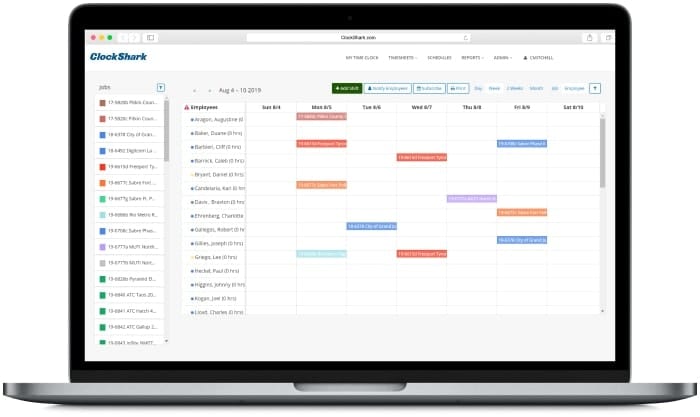
ClockShark pairs GPS time tracking with drag-and-drop scheduling in a straightforward interface field crews pick up quickly. It’s owned by Simpro Group and built for construction and field service, so it doesn’t carry Connecteam’s non-construction hub structure.
ClockShark’s scheduling is built around individual users rather than crews, which limits how easily you can group and reassign work by jobsite when plans change mid-week. It also has no native prevailing wage or certified payroll support, a real limitation if you bid public or government contracts.
Features
- GPS time tracking with geofencing (GPSFence)
- Drag-and-drop scheduling and shift creation
- Job costing by job (not by granular cost code)
- Kiosk and crew clock-in options for shared devices
- Payroll integrations with QuickBooks, ADP, Gusto, and Paychex
Pricing
- Standard: $40/month base + $9/user/month
- Pro: $60/month base + $11/user/month, adds PTO, advanced job costing, compliance forms
Pros and cons
| Pros | Cons |
| Easy for field crews to learn with minimal training | Reporting is limited to basic filters, no custom fields or formulas |
| Reliable GPS and geofencing for construction-specific use | No native prevailing wage or certified payroll support |
| Handles multi-job clock-ins for crews on several sites | Scheduling is employee-based, not crew-based |
| Direct QuickBooks, ADP, and Gusto integrations | Field-facing app store ratings trail well behind admin-facing scores |
Ratings
The admin-versus-field gap is real for ClockShark. Office users rate it above 4.5 on both G2 and Capterra; field workers dealing with GPS drift and app crashes rate the mobile apps well below that.
| App Store | Google Play | Capterra | G2 |
| 2.9 ⭐(268 ratings) | 3.4 ⭐(90 reviews) | 4.7 ⭐(1,911 reviews) | 4.7 ⭐(337 reviews) |
ClockShark is best for small to mid-size contractor crews that want GPS time tracking and scheduling in one app without a steep learning curve.
See our full ClockShark review, our side-by-side Workyard vs. ClockShark comparison, or our ClockShark alternatives guide.
3. busybusy – Best free plan for construction job costing
busybusy is a construction time tracking and job costing app, now owned by AlignOps, with a genuinely free tier that includes GPS time tracking, job costing, and equipment tracking for unlimited users. That’s a rare combination among Connecteam competitors at the free-plan level.
The Free tier caps out before scheduling, custom permissions, and enhanced GPS breadcrumbing, all of which require the Pro or Premium tier plus a separate $40/month admin license.
Features
- GPS time tracking and clock in/out on the Free tier
- Job costing and equipment tracking on the Free tier
- Scheduling, supervisor tools, and enhanced GPS on Pro and above
- Daily project reports and team messaging on Premium

Pricing
- Free: Limited features, unlimited users
- Pro: $11.99/user/month + $40 admin license ($9.99/user/month billed annually)
- Premium: $17.99/user/month + $40 admin license ($14.99/user/month billed annually)
Pros and cons
| Pros | Cons |
| Free tier includes job costing and equipment tracking, not just clock in/out | Scheduling and enhanced GPS require paying up to the Pro tier |
| Reliable offline mode | Separate $40/month admin license fee on top of per-user pricing |
| Strong construction-specific integrations, including Sage, Foundation, ComputerEase, and Procore | No crew-based scheduling; assignment is job- and project-based, not crew-unit based |
| High G2 rating relative to review volume |
Ratings
busybusy’s app store scores hold steady around 4.0, while its admin-facing Capterra and G2 scores run higher still, a smaller version of the same admin-versus-field pattern seen elsewhere in this list.
| App Store | Google Play | Capterra | G2 |
| 4.0 ⭐(920 ratings) | 4.0 ⭐(651 ratings) | 4.5 ⭐(441 reviews) | 4.8 ⭐(158 reviews) |
busybusy is best for construction crews that want job costing and equipment tracking without paying for it, at least until they need scheduling.
See our in-depth busybusy review or our Workyard vs. busybusy comparison. You can also see our busybusy alternatives guide.
4. Homebase – Best for hourly teams that also need hiring tools
Homebase is built for hourly, single-location teams first, in restaurants, retail, and service businesses, with scheduling, time tracking, and hiring tools bundled per location rather than per user. A crew of any size on Essentials runs $24/month, since Homebase doesn’t charge per user.
Homebase has no job costing. It tracks hours and labor cost against sales, not against jobs or cost codes, so it isn’t built for contractors billing by project.
Features
- Scheduling and basic time tracking free for one location, up to 10 users
- GPS-based clock-in and advanced scheduling from the Essentials tier up
- Hiring, onboarding, and HR compliance tools on Plus and All-in-One
- Payroll add-on available on every tier

Pricing
- Basic: Free, 1 location, up to 10 users
- Essentials: $30/month per location, or $24 billed annually, unlimited users
- Plus: $70/month per location, or $56 annually
- All-in-One: $120/month per location, or $96 annually
Payroll add-on: $39/month plus $6/employee paid, or $49/month on monthly billing
Pros and cons
| Pros | Cons |
| Genuinely free tier for a single location with up to 10 users | No native job costing tied to projects or cost codes |
| Hiring and onboarding tools built in, not bolted on | Per-location pricing doubles fast for contractors with multiple jobsites treated as locations |
| Unlimited users per location on every paid tier | Some reviewers report app lag and slow schedule updates |
| Strong ease-of-use praise across G2 and Capterra | GPS is clock-in and clock-out only, not continuous |
Ratings
Homebase’s ratings run strong and fairly even across every platform, with a small but glowing App Store sample sitting alongside a Google Play base of nearly 25,000 ratings that holds up almost as well.
| App Store | Google Play | Capterra | G2 |
| 4.9 ⭐(132 ratings) | 4.2 ⭐(24.5K ratings) | 4.6 ⭐(1,151 reviews) | 4.6 ⭐(564 reviews) |
Homebase is best for single-location contractors and small service businesses that want scheduling, time tracking, and hiring tools without job-costing depth.
See our Homebase review or how it stacks up in this Workyard vs. Homebase comparison.
5. When I Work – Best for schedule-first teams over job-cost-first teams
When I Work leads with scheduling: auto-scheduling, multi-week views, shift swapping. Time tracking is an add-on toggle, not core, and offline clock-in is a real gap: a jobsite, basement, or rural spot with spotty signal can block clock-in entirely.
The current Essentials, Pro, and Premium tiers replaced an older single-location and multi-location split a few months ago, so plan names may not match what you remember. The upshot is pricing that’s simpler to model per user, regardless of crew or location count.
Features
- Auto-scheduling, multi-week and multi-location scheduling
- Time Tracking and Attendance as an add-on toggle, not core to every plan
- In-app team messaging and OpenShifts and shift swapping
- Role permissions, labor sharing, and custom reporting on Pro and Premium

Pricing
- Single location or schedule: $2.50/user/month
- Multiple locations or schedules: $5/user/month
Pros and cons
| Pros | Cons |
| Strong scheduling automation and shift-swap tools | No job costing or cost-code allocation |
| Lowest per-seat entry price in this roundup among paid tiers | Time tracking is an add-on, not built into the core plan |
| Clean, well-reviewed mobile interface | No reliable offline clock-in for low-signal jobsites, per its own category documentation |
| Multi-location and labor-sharing support on Pro and up | No GPS geofencing comparable to construction-built tools |
Ratings
When I Work’s ratings are strong and remarkably consistent across every platform, backed by tens of thousands of app store reviews, the largest review base of any tool in this list.
| App Store | Google Play | Capterra | G2 |
| 4.8 ⭐(56K ratings) | 4.8 ⭐(75.9K ratings) | 4.5 ⭐(1,299 reviews) | 4.4 ⭐(398 reviews) |
When I Work is best for shift-based teams where scheduling automation matters more than GPS-verified job costing.
See our full When I Work review or our side-by-side Workyard vs When I Work comparison.
6. Deputy – Best for multi-location compliance and biometric verification
Deputy leans into labor law compliance and demand-driven scheduling harder than any other tool in this list, with biometric face-unlock clock-in on its Core and Pro tiers to eliminate buddy punching. It restructured its pricing in October 2025 into a simpler Lite, Core, and Pro lineup.
For contractors managing crews across multiple states, that compliance depth is a real advantage over Connecteam and most tools here. Deputy, like Homebase and When I Work, has no native job costing, and some reviewers report crew pushback over location tracking introduced without context.
Features
- Auto-scheduling and demand forecasting
- Biometric time clocking on Core and Pro
- Advanced labor law compliance tools
- Payroll add-on via Paycor integration

Pricing
- Lite: $5.50/user/month, or $5/user/month, billed annually
- Core: $7.25/user/month, or $6.50/user/month, billed annually
- Pro: $10/user/month, or $9/user/month, billed annually
Payroll add-on via Paycor: $8/user/month plus a $49/month base fee
Pros and cons
| Pros | Cons |
| Biometric clock-in reduces buddy punching more reliably than GPS alone | No native job costing or cost-code allocation |
| Strong multi-state labor law compliance tooling | $30/month minimum spend on monthly plans regardless of headcount |
| Demand forecasting and auto-scheduling built in | Biometric data collection can raise consent and privacy concerns with crews |
| High, consistent G2 and Capterra ratings across a large review base | Pricing restructured recently, so older third-party comparisons may show stale numbers |
Ratings
Deputy’s ratings are strong and consistent across every platform, with tens of thousands of app store reviews backing up its admin-facing Capterra and G2 scores.
| App Store | Google Play | Capterra | G2 |
| 4.8 ⭐(4.6K ratings) | 4.7 ⭐(19.3K ratings) | 4.6 ⭐(773 reviews) | 4.6 ⭐(666 reviews) |
Deputy is best for contractors operating across multiple states or municipalities who need labor law compliance more than job costing.
See our full Deputy review.
7. Sling – Best budget option for very small crews
Sling, now owned by Toast, has the most generous free tier in this roundup: scheduling, messaging, and shift swaps stay free for up to 30 users with no time limit and no credit card required. It also has the cheapest paid tier of any tool here once you need time tracking.
It’s built for restaurant and hospitality shift work first, has no native GPS time tracking, and no job costing. That makes it a fit only for the smallest, simplest contractor crews.
Features
- Free scheduling, messaging, and shift swaps for up to 30 users
- Mobile time tracking and labor cost management on Premium
- Kiosk time tracking, PTO management, and reports on Business
- Break attestation and no-show tracking on Business

Pricing
- Free: $0, up to 30 users
- Premium: $2/user/month, or $1.70/user/month, billed annually
- Business: $4/user/month, or $3.40/user/month, billed annually
Pros and cons
| Pros | Cons |
| Cheapest paid tier in this roundup | No native GPS time tracking at any tier |
| Free plan covers real scheduling functionality, not just a demo | No job costing or cost-code allocation |
| Simple, well-reviewed mobile interface | Built for restaurant and retail shift work, not jobsite crews |
| Fair billing that prorates when someone is deactivated mid-cycle | Smaller review base than most tools in this list |
Ratings
Sling’s ratings are strong on iOS specifically, with a large App Store following, while its Android score runs noticeably lower, though its admin-facing Capterra and G2 scores stay solid either way.
| App Store | Google Play | Capterra | G2 |
| 4.7 ⭐(27K ratings) | 4.2 ⭐(10.1K ratings) | 4.6 ⭐(211 reviews) | 4.4 ⭐(88 reviews) |
Sling is best for very small crews or single-location contractors who mainly need free scheduling and can live without GPS or job costing.
Other Connecteam alternatives to consider
Buddy Punch didn’t make the main list here since it’s a generic time clock rather than a deskless-workforce or construction-specific tool, but it’s worth a look if your main concern is stopping buddy punching specifically.
See our Buddy Punch review or Workyard vs. Buddy Punch article for the detailed comparison.
Final recommendation
If your crew works jobsites and you need hours tied to jobs and cost codes, Workyard is the strongest fit here, the only tool built around construction-specific job costing rather than shifts or locations, and the clearest pick for contractors switching off Connecteam. See our full Workyard vs. Connecteam comparison for the detailed feature-by-feature breakdown.
ClockShark and busybusy are reasonable construction-native runners-up at a lower entry price if you can live with lighter reporting.
Homebase, When I Work, Deputy, and Sling suit shift-based hourly teams, like restaurants and retail, better than jobsite crews, and are worth considering only if your business looks more like a single-location shop than a multi-site contractor.
References
- 1
ClockShark. One Platform Affordable Pricing. www.clockshark.com/pricing/
- 2
busybusy. Time Tracking That Employees & Office Staff Actually Love. busybusy.com/price
- 3
Homebase. Find A Plan to Fuel Your Goals. www.joinhomebase.com/pricing
- 4
When I Work. Simple Pricing for Every Team. wheniwork.com/pricing
- 5
Deputy. Pricing plans. www.deputy.com/pricing
- 6
Sling. Pricing. getsling.com/pricing/
The best Connecteam alternatives depend on whether your team works jobsites or shifts, since that split determines which apps like Connecteam actually fit: Workyard, ClockShark, and busybusy lead for jobsite crews that need GPS time tracking tied to job costing, while Homebase, When I Work, Deputy, and Sling lead for shift-based hourly teams in restaurants and retail.
For contracting businesses specifically, Workyard is the strongest overall pick, since it’s the only option built around construction-specific job costing rather than general shift scheduling.
Connecteam’s biggest competitors split into two groups depending on what your team actually does day to day: for restaurants, retail, and other shift-based hourly teams, the closest software like Connecteam options are When I Work, Homebase, and Sling, while Workyard, ClockShark, and busybusy compete hardest in construction by adding the job costing Connecteam doesn’t have.
Which group of apps like Connecteam actually matters comes down to whether your crew works jobsites or shifts, and whether job costing or shift coverage is the bigger daily problem.
Connecteam is a horizontal deskless workforce app covering communication, scheduling, HR, and training across any industry, the same broad category most software like Connecteam falls into, while Workyard is purpose-built for construction, with continuous GPS, automatic job costing by cost code, and direct payroll integrations.
Connecteam has no native job costing at all, which is the main reason construction contractors switch, though it does offer company-wide chat and training modules that Workyard doesn’t build for.
Connecteam and Homebase both target broad, non-construction-specific teams, but their pricing models differ in a way that matters at scale: Connecteam charges per hub plus a per-user rate, while Homebase charges a flat fee per location with unlimited employees included at each site, regardless of headcount.
Neither has native job costing, and both capture GPS only at clock-in and clock-out rather than continuously throughout a shift. Homebase adds hiring and onboarding tools Connecteam doesn’t build for, while Connecteam’s hub structure covers broader HR and skills training instead.
Connecteam and When I Work both lead with scheduling and team communication, but they differ in what’s core versus optional: When I Work treats time tracking as an add-on toggle you switch on per tier, while Connecteam bundles time tracking, communication, and HR into its Operations, Communications, and HR and Skills hubs from the start.
When I Work’s entry price is lower, at $2.50 per user per month versus Connecteam’s per-hub-plus-per-user model, but neither has native job costing, and When I Work’s offline clock-in is a documented gap for low-signal locations.
Connecteam’s Small Business plan is free for up to 10 users with full access to every hub, and paid plans start at $29/month base for the first 30 users on a single hub, covering GPS clock-in and clock-out, payroll integration, unlimited checklists, and core scheduling.
Advanced runs $49/month base and adds full time clock customization, auto clock-out, and up to 10 geofence locations, while Expert runs $99/month base and adds unlimited sub-jobs, multiple schedule types, and API access. Enterprise is quote-based and adds unlimited time clocks and schedules plus biometric app lock.
Yes, Connecteam’s Small Business plan is free for up to 10 users, and unlike many “free forever” plans that strip out core functionality, it gives full access to every hub rather than a limited feature set, which is more generous than most competitors’ free tiers offer.
That 10-user cap includes anyone still on your account, even people who’ve since left the company, so archiving former team members regularly matters if you’re trying to stay under the limit long-term. If your team grows past 10 people, you’ll need to move to a paid tier to keep using Connecteam at all.
Yes, Connecteam is a legitimate, well-established company backed by institutional investors, having raised $160 million across three funding rounds, most recently a $120 million Series C in 2022 led by growth equity firm Stripes and Insight Partners, and it now serves more than 36,000 organizations worldwide.
Strong admin-facing ratings on G2 and Capterra back up that scale, though field-facing app store ratings run lower, which is common across this entire category of deskless workforce software and worth checking against your own crew’s day-to-day use on a phone before committing to any vendor’s contract terms.
Connecteam captures GPS location at clock-in and clock-out, not continuously throughout a shift, which is breadcrumb-level tracking rather than the live, continuous location several construction-specific alternatives use instead, and that distinction matters most for crews moving between multiple job sites during a single day.
Breadcrumb-only tracking can’t automatically detect a mid-shift move the way those alternatives can, since they track location the entire time a worker is clocked in rather than just at the two endpoints.
For construction and field service, Workyard, ClockShark, and busybusy all integrate directly with QuickBooks, and most support ADP and Gusto as well, which together cover the accounting stack most contractors are already running, whether that’s QuickBooks Online, QuickBooks Desktop, or a similar platform already in place.
busybusy adds native Sage and Foundation connections that most horizontal Connecteam alternatives, including Connecteam itself, don’t offer at all. See our full time tracking integrations breakdown before committing to any single accounting or payroll platform version.


