Skip to content
Log InBook a demo
Book a demo
Free template · paper and digital

Impact Driver Inspection Report

Checks an impact driver before use and records whether it's safe to run, or what was done to repair or tag it out.

WordExcel
  • No email
  • No sign-up
  • Edit it, add your logo
See every check

The template

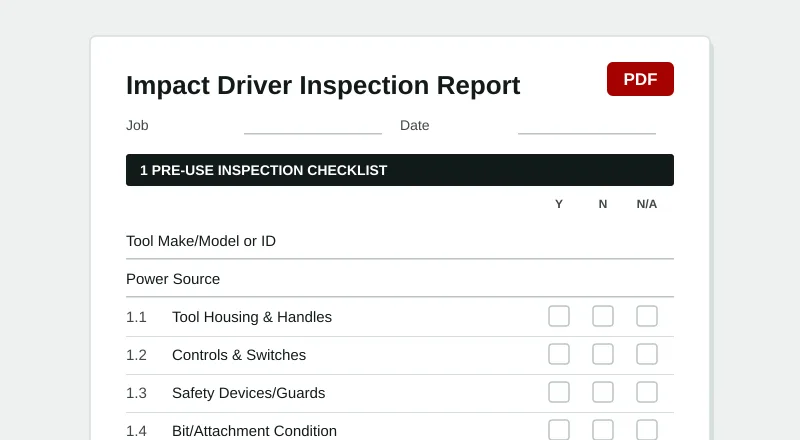
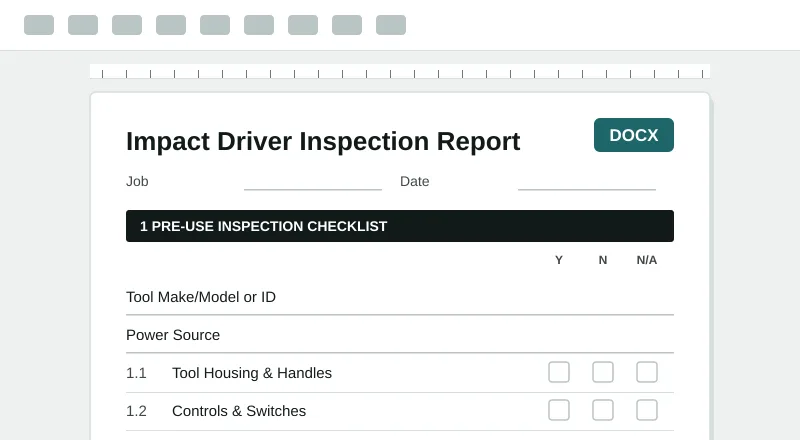
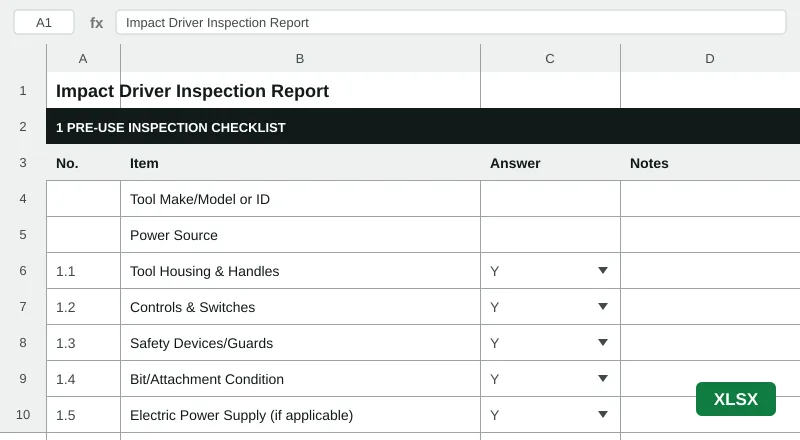
The full Impact Driver Inspection Report

Print it for the clipboard, or put it on your crew’s phones. Same 10 checks either way.

Your logo

Impact Driver Inspection Report

This free Impact Driver Inspection Report is used to verify that cordless or corded impact drivers are in safe and operable condition. It helps identify wear, electrical issues, or missing safety guards before use.

Job
Date

1 · Pre-Use Inspection Checklist

Tool Make/Model or ID
Power SourceCorded ElectricCordless/BatteryPneumatic (Air)HydraulicOther

Before using the impact driver, inspect the following items. Mark each as Yes (Pass), No (Fail), or N/A (Not Applicable). For each 'No', provide details below.

Before using the impact driver, inspect the following items. Mark each as Yes (Pass), No (Fail), or N/A (Not Applicable). For each 'No', provide details below.YNN/A
1.1Tool Housing & Handles: No cracks, breaks, or other damage.
1.2Controls & Switches: Trigger, directional switch, and mode selectors operate freely.
1.3Safety Devices/Guards: All required safety features are present and functional.
1.4Bit/Attachment Condition: The driver bit or socket is impact-rated, the correct type, and in good condition.
1.5Electric Power Supply (if applicable): Electric cord is intact with no fraying or exposed wires.
1.6GFCI Protection (if corded): Tool is plugged into GFCI-protected power or covered by an assured grounding program.
1.7Battery Pack (if cordless): No cracks, swelling, or damaged terminals; charger in good condition.
1.8Pneumatic/Hydraulic Supply (if applicable): Air or hydraulic hose is in good condition.
1.9Operational Test: The tool should run smoothly without unusual vibrations or noises.
1.10PPE and Environment: Operator is wearing appropriate PPE and the work area is safe.

2 · Completion & Sign-off

Overall Status: Based on the inspection, is the impact driver safe to use?YesNo
If no: Describe the issue and actions taken (e.g. part replacement, tool tagged out, sent for repair):
Inspector Name
Name
Signature
Date
Job Site / Location
Date
Name
Signature
Date
Free download

Impact Driver Inspection Report template: PDF, Word and Excel

Print the form as it is, or download a template you can edit. Every format is free, with no email and no sign-up.

How to use it

How to run the Impact Driver Inspection Report

  1. 01

    Check it before the first start

    Do it at the start of every shift, before the machine moves, with the operator who’ll run it.

  2. 02

    Walk around, then test from the seat

    Work through the 2 sections: fluids and the walk-around first, then controls, brakes and safety devices with it running.

  3. 03

    A fail means it stays parked

    Tag out anything that fails and report it to the shop or the super, with a photo. It doesn’t run until it’s fixed.

  4. 04

    Sign it and keep it with the machine

    The operator signs. Keep each day’s sheet with the machine, so the next operator and the inspector can see its history.

Why we built this

Most breakdowns give a warning first

A leak, a worn hose, brakes that feel soft. A few minutes at the start of the shift catches them before they cost a day of downtime, or someone’s safety.

  • Built for the field. Every check is written the way crews talk, with room for notes, photos and a signature.
  • Free, with no catch. No email, no account. Print it and hand it out.
  • On paper or on the phone. The same form runs on the Workyard app, filed to the job when it’s sent.

3,000+contractors run their crews on Workyard

Meet Workyard

Who we are

Workyard is the construction operations platform for specialty contractors and self-performing general contractors determined to grow without sacrificing job control or margins.

Forms like this one are what our customers’ crews fill in on Workyard every day, on the same app they clock in with.

workers on Workyard every day
100,000+
free templates, none of them gated
182

Forms & Workflows

Get every form back from every crew, every day

  • It shows up on its own. Attach it to a task, a job or clock-out, and it’s on the crew’s phone when it’s due.
  • It can’t be skipped. Make it required and the day can’t close until it’s in.
  • You see it the same day. Filed, flagged or missing, every job on one board, before anyone has to call.

$123,000cut from insurance costs at TR3 Group

More equipment pre-start checks templates

Free templates for the rest of the job

  • Equipment Pre-Start Checks

    Hand Tool Inspection Checklist

  • Equipment Pre-Start Checks

    Circuit Breaker Inspection Checklist

  • Equipment Pre-Start Checks

    Circular Saw Inspection Checklist

  • Equipment Pre-Start Checks

    Fall Arrest Harness Inspection

Browse all templates

Questions

Impact Driver Inspection Report FAQs

Why inspect an impact driver before use?

Pre-use inspections help prevent equipment malfunctions and accidents on site by identifying worn-out parts, electrical faults, or physical damage that could compromise safety. Detecting issues before operation reduces the risk of injury and extends the lifespan of the tool. Regular inspections also ensure the impact driver performs efficiently and reliably each time it is used.

What should be checked on an impact driver?

Inspect key components such as the trigger, chuck, bit lock, casing, power supply (battery or cord), and all safety features for signs of damage or wear. Pay special attention to issues like overheating, frayed cords, loose fittings, or cracks in the chassis. Ensuring all parts are secure and functioning correctly maintains both safety and tool performance.

Who should complete the inspection?

The primary responsibility for inspecting the impact driver usually lies with the user, as they are most familiar with its daily operation and condition. However, site safety officers or supervisors may also conduct scheduled or random inspections to reinforce compliance and catch any overlooked issues. This shared responsibility helps promote a culture of safety on the job site.

How often should the tool be checked?

Ideally, the impact driver should be inspected before each use, especially for tools that are shared among multiple workers or used frequently throughout the day. Additional inspections are recommended after any drops, exposure to harsh conditions, or incidents that could have caused hidden damage. Frequent checks minimize downtime and help keep everyone safe.

Do I need a Workyard account to use it?

No. Print the paper form, save it as a PDF, or download the Word or Excel file, free, with no email and no sign-up. You only need an account to put the digital form on your crew’s phones.

Can I edit the template?

Yes. Download the Word or Excel version to add your logo, add checks from your project spec or remove sections you don’t need. They open in Google Docs and Google Sheets too.

How do I get my crew to fill it in on their phones?

Add the digital form to Workyard and attach it to the job or the task it belongs to. It shows up in the app your crew already clocks in with, and every form comes back signed, with its photos, filed to the job.

Trigger the form at the right moment

A job's Forms tab in Workyard: each form, the clock-in or clock-out that triggers it, and how many have been submitted
A van check filled in on the Workyard app: the damage photo, a description and the tech's signature, ready to submit

Book a demo with a Workyard specialist

Your local Workyard specialist

Works with 50 contractors across the US

Your details

30 min · Video call